Video Library
This section showcases the video capabilities of this Knowledge Base (KB). Ideally, explainer videos should be embedded directly within the context of their corresponding KB articles.
YouTube videos
Example of a YouTube video embedded in the article (position and size can be adjusted):
Video Files
All modern browsers have an integrated media player, allowing visitors to play MP4, WebM, and other video files directly within the article. Unlike YouTube videos, there are no advertisements or Calls-to-Action (CTAs) prompting users to leave the KB.
It is also possible to preset the media player controls. In the following example, the mp4 video is preset to mute, displayed at 50% width, and centered on the page.
Interactive Cards
Sometimes, during a video, you may want to point viewers to ancillary videos or articles. For example, if a video covers Topic B, you might want to recommend watching a video about Topic A first.
In the following example, a custom card is configured to appear at the 9-second mark and disappear at the 18-second mark. Every aspect of the card's appearance and timing can be customized. In this example, rather than linking to another video, this card directs you to a specific section within a Knowledge Base article.
Animated GIF
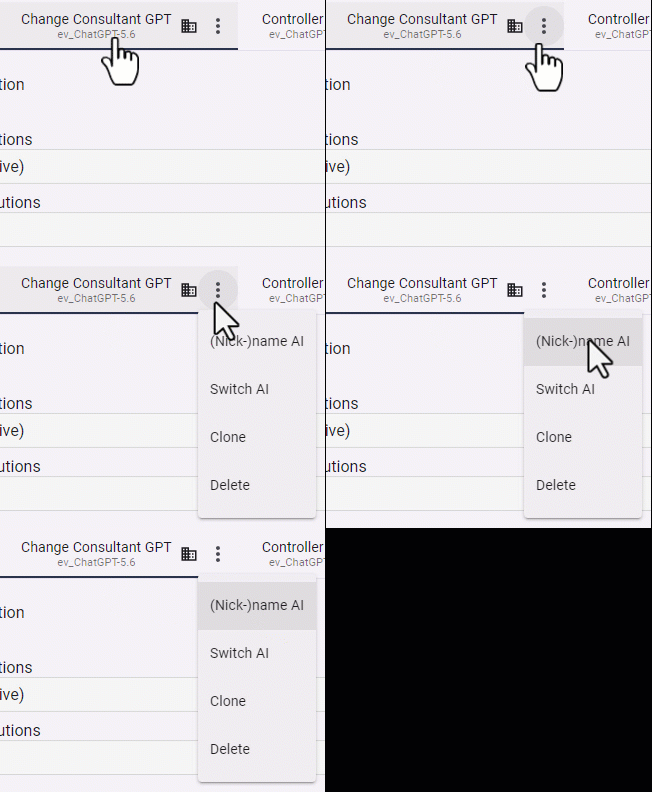
Sometimes you just need an animated gif to illustrate your point.
For example, to show how to reveal the Change nickname AI option:
Sometimes a plain image with steps can be more efficient:
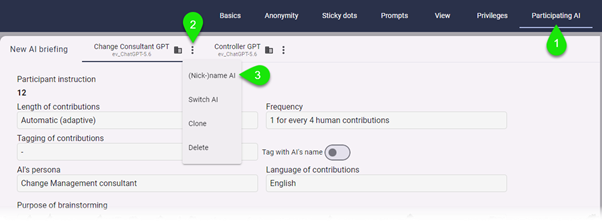
To change the AI nickname in the BS workspace, navigate to Workspace settings then this (1), then that (2). Finally do (3).